
The best ATS for independent recruiters puts every candidate and stage for every client role in one place, gives you a shareable job page, sends email from inside the tool, and doesn't charge per seat. Test it on one live role before you pay, and make sure you can export everything you put in.
By Dev Rishi Khare, former machine learning engineer at Amazon (search and recommendations) and Synopsys
If you recruit on your own, your current system is probably Gmail, a spreadsheet with a tab per client, and a calendar full of screen calls you booked by hand. That setup holds up for a role or two. Add a few more and people start slipping through, often the good applicant who wrote in on a Thursday afternoon.
This guide is for the recruiter who is the whole desk. The advice and rules of thumb here are Dev's view, built from his own prospect calls and his background in search and recommendations at Amazon.
What an independent recruiter needs from an ATS on day one
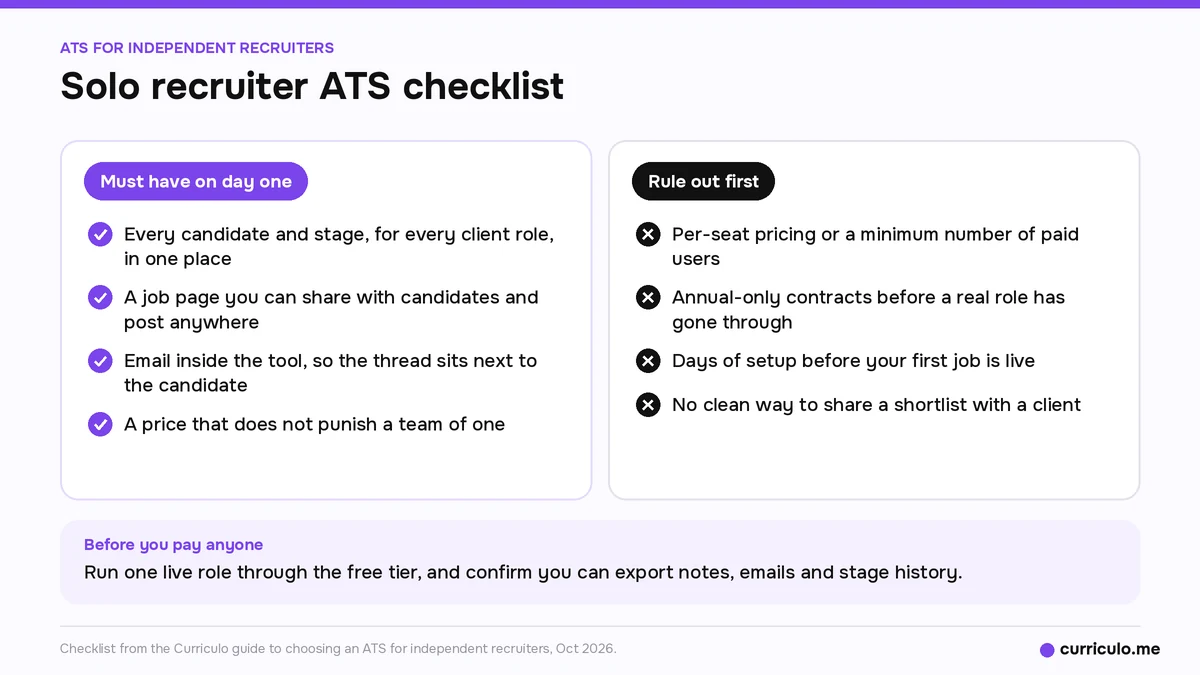
In Dev's view, the day-one list is short:
- Every candidate and every stage, across all your client roles, in one place instead of Gmail plus a spreadsheet.
- A job page you can share with candidates and post anywhere.
- Email inside the tool, so the thread sits next to the candidate.
- A price that doesn't punish a team of one.
That's it for week one. Big agency tools push a different list on you: permissions for multiple desks, CRM and business development pipelines, heavy reporting, onboarding calls, and annual contracts. Those make sense for a firm with a sales team and an ops manager. For a solo recruiter they mostly add records to maintain.
Deal-breakers to rule out first
Dev's deal-breakers, in the order he'd check them:
- Pricing per seat, or a minimum number of paid users. You may add a part-time sourcer next quarter, and your bill shouldn't double when you do.
- Annual-only contracts. You can't know if a tool fits until a real role has gone through it.
- Days of setup before your first job is live. If the vendor needs an onboarding call before you can post, the tool is sized for someone else.
- No clean way to share a shortlist with a client. If sharing means exporting a spreadsheet and attaching resumes to an email, you're back where you started.
One more check that people skip: export. Your candidate network is the business. Before you commit, ask what you can take with you if you leave, and whether notes, emails and stage history come along.
What came up on Dev's prospect calls
Between May and August 2026, Dev ran calls with prospects. They included independents in Boston and Brooklyn and a UK agency founder. Three requirements stood out:
- One prospect wouldn't buy without GDPR compliance.
- Two stressed drip campaigns.
- One wanted calling.
That's a handful of calls, so read it as a test list for your own shortlist of vendors. Data protection can be a hard gate the moment you take on a UK or EU client. Follow-up sequences decide whether sourced candidates ever reply. And if calling is already how you work, a tool without it pushes that part of your week back onto your phone.
Where your week goes, and what to hand to the tool
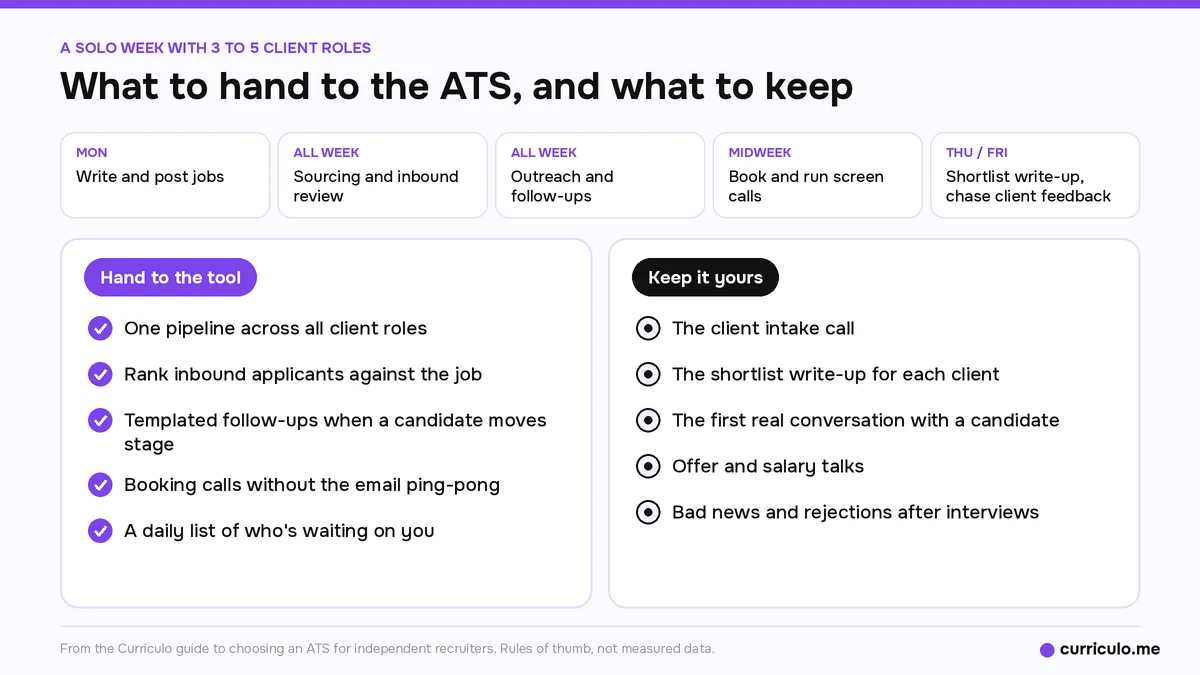
Picture a solo week with three to five client roles. Monday you write and post jobs. Sourcing and inbound review run all week. Outreach and follow-ups fill the gaps. Screen calls need booking, then happen. Thursday or Friday you write up the shortlist, and then you chase client feedback.
In Dev's view, the time goes to three things: sorting inbound applicants, the email and calendar back-and-forth to book a call, and chasing feedback from both candidates and clients.
A proper ATS makes these faster:
- One pipeline across all roles, so you aren't flipping between a tab per client.
- Inbound applicants ranked against the job, so you read the strongest first.
- Templated follow-ups that go out when a candidate moves stage.
- Booking without the ping-pong.
- A daily list of who's waiting on you.
If ranking a big pile is new to you, the resume screening guide to keyword scans, manual review and AI scoring walks through a 300-applicant role step by step.
Some of the week should stay yours. Dev keeps these manual: the client intake call, the shortlist write-up that explains why this person fits this client, the first real conversation with a candidate, offer and salary talks, and bad news. Automating those is how independents become interchangeable.
Free vs paid when you're a team of one
Pick a vendor whose free tier runs real roles, not a demo stuffed with sample data. You should be able to post a job, take applicants, rank them and send a shortlist without paying.
Dev's upgrade trigger is volume and time. Move to a paid plan when your open roles together pass the free plan's limits, or when you notice you're sorting by hand again. His rule of thumb is that one extra placement a quarter pays for it. It depends on your fees, so run your own numbers.
For a wider comparison, see the best free ATS picks for small teams and recruiters in 2026.
Data protection questions to ask any vendor
If you place candidates with UK or EU clients, someone will ask how candidate data is handled. Ask every vendor, in writing:
- Where candidate data is stored, and how deletion on request works.
- Whether they sign a data processing agreement (DPA).
- Which subprocessors see the data, including AI model providers.
- How long data is kept by default.
- Whether you can export everything.
- How access to accounts is secured.
This list is a general checklist, not legal advice. Compare the answers with what your client contracts require.
Follow-up that helps instead of annoying people
Candidate drips should be short, triggered by a stage change, and useful. A good one confirms the application, says what happens next and when, and gives a real update if the client is slow. Dev's rule of thumb is two to four touches per stage, plain text, from a person's name, with an easy way to opt out.
For clients, one short weekly note per role does the job: how many are in the pipeline, who's in front of them now, and what you need from them. To check whether your shortlist is the right size, compare it with the benchmarks for how many candidates get interviewed per hire.
Save calling and WhatsApp for time-sensitive moments, like confirming a same-day interview slot or a morning reminder, and for markets where candidates live on WhatsApp.
What turns follow-up into spam, in Dev's view:
- Weekly drips with no news.
- The same message at every stage.
- Automated calls without consent.
- Messages outside working hours in the candidate's time zone.
- Anything that keeps going after a no, or after three unanswered touches.
Never automate post-interview rejections, offers and salary, first contact with a passive candidate you headhunted, client escalations, or anything that pretends a person wrote it live.
Five mistakes when picking your first ATS
- Buying the big agency tool sized for 50 desks and priced per seat.
- Signing an annual contract before one real role has gone through it.
- Comparing feature lists instead of your daily loop: applicants in, rank, follow up, submit.
- Not checking export.
- Ignoring candidate experience. A clunky apply flow loses the best applicants first.
Dev's one-line advice: run one live role through the free tier before you pay anyone, and keep the tool that got you to a shortlist fastest.
His contrarian take is to skip buying for three years out. Buy for this quarter, with no per-seat fees and no lock-in. A CRM-heavy agency suite makes a solo recruiter slower, because you end up maintaining the system instead of placing people. If you do grow into a small agency later, the guide to an ATS for recruiting agencies with unlimited members picks up from there.
Where Curriculo ATS fits
We built it for this kind of desk. Starter is free forever, with unlimited jobs and team members, and ranks up to 1,000 candidates. You also get automated drip campaigns on Starter. Pro is $50/mo early-bird (50% off the $100 list price) and ranks up to 10,000. Enterprise is custom, and there are no per-seat fees on any plan.
Curriculo ATS scores every candidate from 0 to 100 against your job, with a written AI summary of the fit. The Email, Calendar, Daily briefing and Resume screening agents work automatically behind the scenes once you sign in. You get a public careers page for your jobs, and there's WhatsApp automated calling, using your own number or a Curriculo number.
On security, here's what we can state: Sign in with Google or Microsoft, and AES-256-GCM for mailbox and calendar tokens. For the rest of the checklist above, ask us in writing, the same as any vendor. Full plan details are on the pricing page for the Starter and Pro plans.
Frequently asked questions
What is the best ATS for independent recruiters?
In Dev's view, the best fit keeps every candidate and stage for all your client roles in one place, gives you a shareable job page and email inside the tool, and has no per-seat fees. Run one live role through the free tier before paying.
Should a solo recruiter use a free ATS?
In Dev's view, yes, if the free tier runs real roles. Upgrade when your open roles together pass the free plan's limits or you find yourself sorting applicants by hand again.
What should I ask an ATS vendor about GDPR?
Ask where candidate data is stored and how deletion works, and whether they sign a DPA. Ask which subprocessors see data, including AI model providers, plus the default retention period, whether you can export everything, and how account access is secured. Get the answers in writing.
Which recruiting tasks should stay manual?
Keep the client intake call, the shortlist write-up, the first real candidate conversation, offer and salary talks, and rejections after interviews. Let the tool handle sorting, booking, templated follow-ups and reminders.
Do independent recruiters need a recruiting CRM?
Dev's view is that most don't on day one. A CRM-heavy agency suite tends to make a solo recruiter slower. Start with an ATS that runs your daily loop and add more only when a real need shows up.
More guides for solo recruiters and small hiring teams are on the Curriculo ATS blog.