
Build a hiring pipeline by listing the decisions each candidate has to pass, then making each one a stage with one owner. Most small teams need five or six: applied, screened, first interview, final interview, offer, and hired or rejected. Set what candidates hear at each stage and how fast.
By Dev Rishi Khare, former machine learning engineer at Amazon (search and recommendations) and Synopsys
What is a hiring pipeline, in one line?
A hiring pipeline is the set of stages a candidate passes through between applying and receiving a final decision. Each stage records where the candidate stands, who needs to act, and what happens next.
See the full hiring pipeline definition if you need to separate pipeline stages from the wider recruitment process.
Why should every stage be a decision, not a label?
Small teams often copy stage names from another company or an ATS template. That can leave you with stages that look organized but don't tell anyone what to do.
One founding recruiter described the problem as "Stage counts that existed to make a funnel look sophisticated." The same recruiter described the better version: "Every stage now maps to a decision a specific person actually makes."
Start by writing down the decisions required for a hire. For each decision, name one owner and the evidence that person needs. Turn those decisions into stages.
A stage called "Manager review" is vague. A stage called "Screened" has a clear exit decision: invite the candidate to an interview or reject the application.
This structure also exposes unnecessary steps. If two stages have the same owner, evidence, and decision, combine them. A small business rarely needs separate stages for recruiter review, resume review, profile review, and shortlist review.
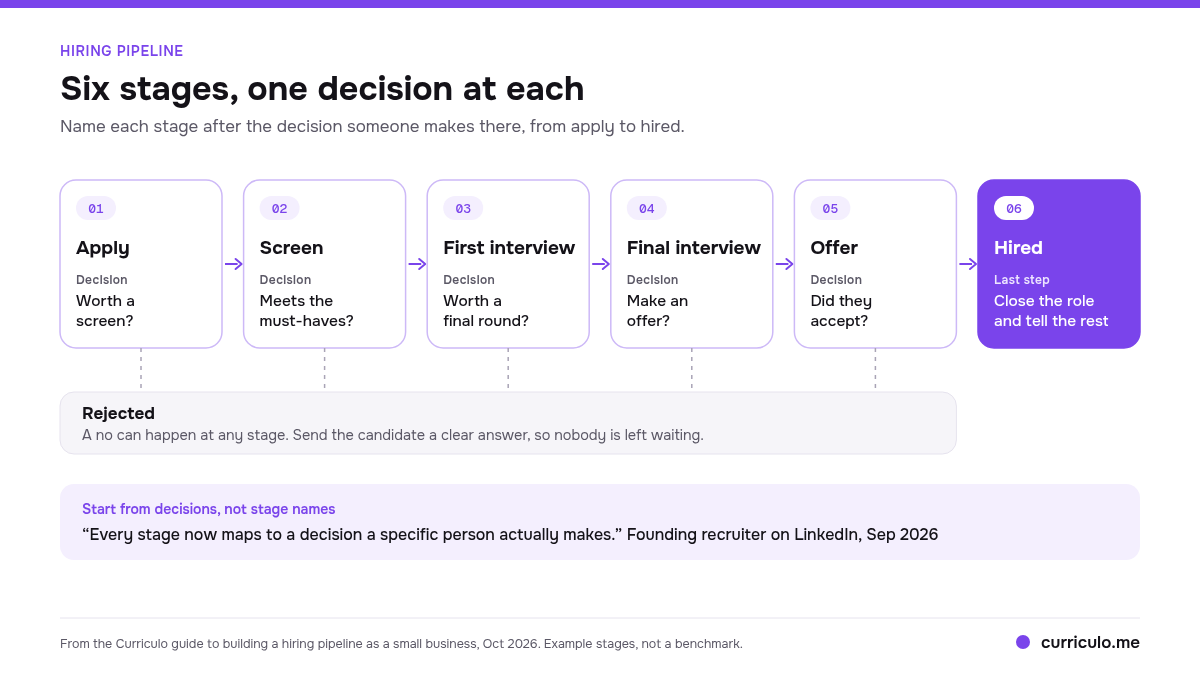
What stages does a small business need?
Five or six stages will cover most small business hiring. The table below is a starting point, not a universal schedule. Set your own target time based on the availability of your team and the role.
| Stage | Decision made | Owner | Suggested target you set | What the candidate hears |
|---|---|---|---|---|
| Applied | Is the application complete and eligible for review? | Recruiter or role owner | Review within two working days | Confirmation that the application arrived |
| Screened | Is there enough evidence for a conversation? | Recruiter or hiring manager | Decide within two working days | Interview invitation or rejection |
| First interview | Does the candidate meet the role's core requirements? | Hiring manager | Record the decision the same day | Next step, timing, or rejection |
| Final interview | Does the team have enough evidence to hire? | Final decision owner | Collect feedback within one working day | Decision timing and any remaining step |
| Offer | Will the business make an offer, and will the candidate accept? | Hiring manager or founder | Set an internal response date | Written offer and response date |
| Hired or rejected | Is the process closed for this candidate? | Recruiter or role owner | Close once the decision is final | Welcome details or a direct rejection |
Applied and screened
The applied stage answers a narrow question: has this person entered the process? Keep it separate from screening so new applications don't become mixed with candidates somebody has reviewed.
At screening, compare every application with the same job requirements. Decide what evidence earns an interview before applications arrive. If your team needs a scorecard or a decision protocol, see the rest of a hiring system.
Name a backup owner too. A founder who reviews applications between sales calls can hold the entire pipeline without noticing. A backup owner prevents the queue from sitting untouched when the primary reviewer is unavailable.
First and final interview
Each interview needs a distinct decision. The first might test whether the candidate can do the work and wants the role. The final might resolve open evidence, confirm working terms, and make the hiring decision.
Don't repeat the first interview with more people. Give each interviewer a defined area to assess, then require written feedback before the group discussion. That keeps a confident speaker from replacing evidence with a strong first impression.
For some roles, one interview is enough. Keep a final interview only when another decision genuinely remains.
Offer, hired and rejected
The offer stage needs an owner, an approved compensation range, and a response date. Decide who can answer candidate questions and who can approve any change.
Move candidates to hired only after acceptance. Close rejected candidates once the decision is final, including strong applicants you considered late in the process. Leaving them in an interview stage makes the pipeline count unreliable and can cause missed follow ups.
What should candidates hear at each stage?
Candidates shouldn't have to infer their status from silence. Write a short message for every stage change before opening the role.
An application confirmation should say the application arrived and what happens next. An interview invitation should include the format, participants, expected length, and scheduling instructions. A rejection should state the decision plainly without promising feedback you can't provide.
Your internal process should cover five points:
- The message sent when a candidate enters the stage.
- The person responsible for sending it.
- The maximum wait before the candidate receives an update.
- The next action expected from the candidate.
- The contact person for questions.
An ATS can handle stage-move emails when a candidate changes stages. A short optional delay gives the owner time to catch a mistaken move before the message goes out. Review rejection messages before sending them, especially after interviews.
When does a spreadsheet stop working?
A spreadsheet can handle one role when one person owns every decision. Trouble starts when the work moves outside the sheet.
A Head of Talent Acquisition described an earlier process this way: "Before using [it], we were relying on spreadsheets and a mix of disconnected tools to track candidates, which created a lot of noise and manual work."
The practical warning signs are easy to spot:
- You open a second role and duplicate tabs or formulas.
- A second reviewer keeps feedback in email or chat.
- Candidate replies sit in an inbox without a matching pipeline update.
- Two people contact the same candidate.
- Nobody can tell how long an application has waited.
- Rejected candidates remain mixed with active candidates.
The problem isn't the spreadsheet itself. It is the gap between the row and the conversations around it. A recruitment consultant described seeing "Six months later, half their recruiters were back in spreadsheets, hiring managers were emailing feedback instead of logging it".
Move to hiring pipeline software when keeping the sheet accurate becomes a separate job. The strongest trigger is usually coordination: a second open role, a second reviewer, or candidate communication spread across email threads.
What should you measure in a small pipeline?
Track counts before building a dashboard. With a small number of applicants, a single candidate can change a conversion percentage sharply.
Start with three measures:
- Count per stage. This shows where candidates are waiting now.
- Time in stage. This shows which decision or owner is holding the process.
- Stage conversion. This shows how many candidates move from one stage to the next.
Read the measures together. A large screening queue with rising time in stage points to reviewer capacity. A sharp drop after the first interview may point to loose screening criteria or an interview that tests something the application never covered.
Break the figures down by job. Combining a sales role with a specialist engineering role can hide what is happening in both.
Review ATS metrics that matter for small teams for a broader measurement set. If interview volume is the concern, compare your process with candidates interviewed per hire.
How do you keep hiring managers in the loop without status pings?
Give hiring managers one pipeline view and a fixed review routine. They should be able to see which candidates need feedback, which interviews are scheduled, and which decisions are overdue without asking for a separate update.
An IT and hiring operations reviewer described the value of that setup: "The candidate pipeline view is intuitive and makes it easy for hiring managers to see exactly where each applicant stands without having to ask HR for an update."
Access alone won't create a habit. Assign each manager a recurring time to review their candidates. Keep feedback requests tied to a candidate and stage. If the manager still sends feedback by email, one owner should record the decision in the pipeline.
A Daily briefing can surface pending work without another status meeting. The pipeline remains the record, while the briefing points each owner toward the decisions waiting for them.
How does Curriculo set this up?
Curriculo is one way to put this model into practice. You can create custom stages per job and use pipeline automations to handle repeatable stage actions. Stage-move emails support an optional delay, and every job has an apply address that routes applications into its pipeline.
Curriculo ATS scores every candidate from 0 to 100 against your job, with a written AI summary of the fit. You still decide who moves forward and who receives the offer.
For routine cleanup, you can reject several candidates at once from a job's pipeline. This doesn't replace review or turn every rejection into an automatic email.
Starter is free forever and includes unlimited active jobs, unlimited team members, and 1,000 ranked candidates. Pro includes 10,000 ranked candidates and costs $50 per month early-bird, which is 50% off the $100 list price. There are no per-seat fees.
Frequently asked questions
What are the stages of a hiring pipeline?
A small business hiring pipeline usually includes applied, screened, first interview, final interview, offer, and hired or rejected. Each stage should correspond to a decision, have one owner, and define what the candidate hears next. You can remove the final interview when one interview provides enough evidence to make the hiring decision.
What is the difference between a hiring pipeline and a talent pipeline?
A hiring pipeline tracks applicants moving through an active hiring process for a specific job. A talent pipeline is a pool of people who may suit current or future roles, including people who haven't applied. One manages active decisions. The other keeps potential candidates available for later contact.
How many stages should a small business hiring pipeline have?
Most small teams need five or six stages. The right number depends on how many distinct decisions your team makes. Combine stages when they have the same owner and decision. Add a stage only when it records a separate outcome, such as a work sample that determines who reaches the final interview.
Can I run a hiring pipeline in Gmail or a spreadsheet?
Yes, for one role with one owner. It becomes harder when you add another reviewer, another open job, or candidate conversations across several email threads. Move to an ATS when maintaining the spreadsheet becomes separate work or when team members can't see the latest decision without asking for an update.
What hiring pipeline metrics matter for a small team?
Track the number of candidates in each stage, how long candidates remain there, and conversion between stages. Review the counts before percentages when hiring volume is low. Measure by job rather than combining different roles. These figures show where work is waiting and where your criteria may need review.