
To reject applicants at volume without ghosting, sort them by stage and give each stage its own timing. Applied-stage candidates get a short templated no within a week or two. Screened candidates hear within a few business days, and interviewed candidates within 1 to 3. When a role closes, everyone still open gets a close-out note.
By Dev Rishi Khare, former machine learning engineer at Amazon (search and recommendations) and Synopsys
Need the wording right now? The free rejection email generator drafts a rejection email for the stage a candidate reached, from resume screen to declined offer, in the tone you pick.
Split the pile by stage before you write a single email, and 200 rejections become a day or two of work. The poster of an r/recruiting thread titled How do I reject 200+ applicants on LinkedIn? was facing exactly that pile. "I am now a bit concerned that I will have to individually email over 200 people to reject them, and that does not feel realistic."
A reply in the same thread was blunter: "LinkedIn jobs are a nightmare for that kind of volume."
The process and rules of thumb below are Dev's view, not measured data. Platform features and laws are described from their official pages, linked by name.
Closing the loop at every stage
Plan for volume at the applied stage, since that's where the pile is biggest. Every applicant should get a clear answer, not just an automatic acknowledgement, so the loop closes.
Screened candidates should get a short note every time, sent soon after the decision rather than held until the role closes. Candidates you interviewed should hear from a person, and finalists should get a call. Don't leave any of them waiting.
When a role closes or goes on hold, make one person responsible for telling everyone else. For agencies, keep candidates updated even when the client goes quiet.
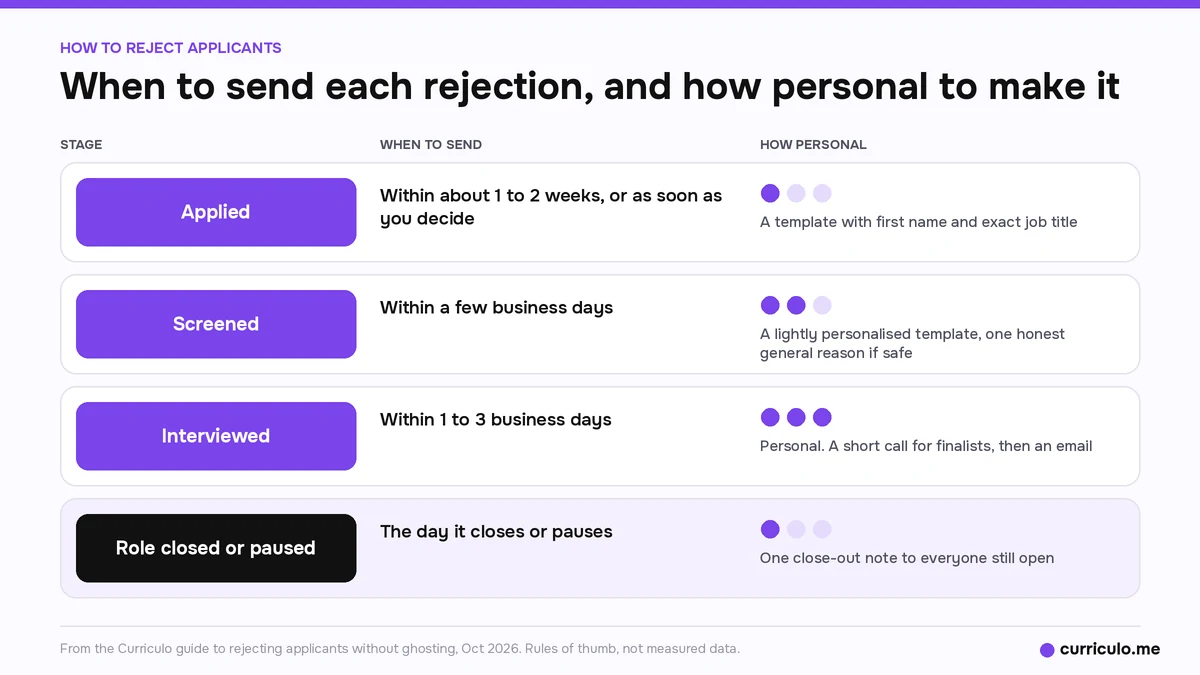
Rejections by stage, with timing
| Stage | When to send | What it says | How personal |
|---|---|---|---|
| Applied | Within about 1 to 2 weeks, or as soon as you decide. Don't hold it until the role closes. | Thanks, a clear no, and optionally a line about other open roles | A template is fine, with first name and exact job title |
| Screened | Within a few business days | Thanks, a clear no, and one honest general reason if it's safe | A lightly personalised template |
| Interviewed | Within 1 to 3 business days, before they hear it elsewhere | Thanks for their time, a clear no, and feedback if you offer it | Personal. A short call for finalists, then an email |
| Role closed or paused | The day it closes or pauses | The role is closed or paused, and it's not about them | One note to everyone still open |
A safe general reason for a screened candidate is that you're moving forward with people who have more hands-on experience with X. Only use it if it matches what you wrote down.
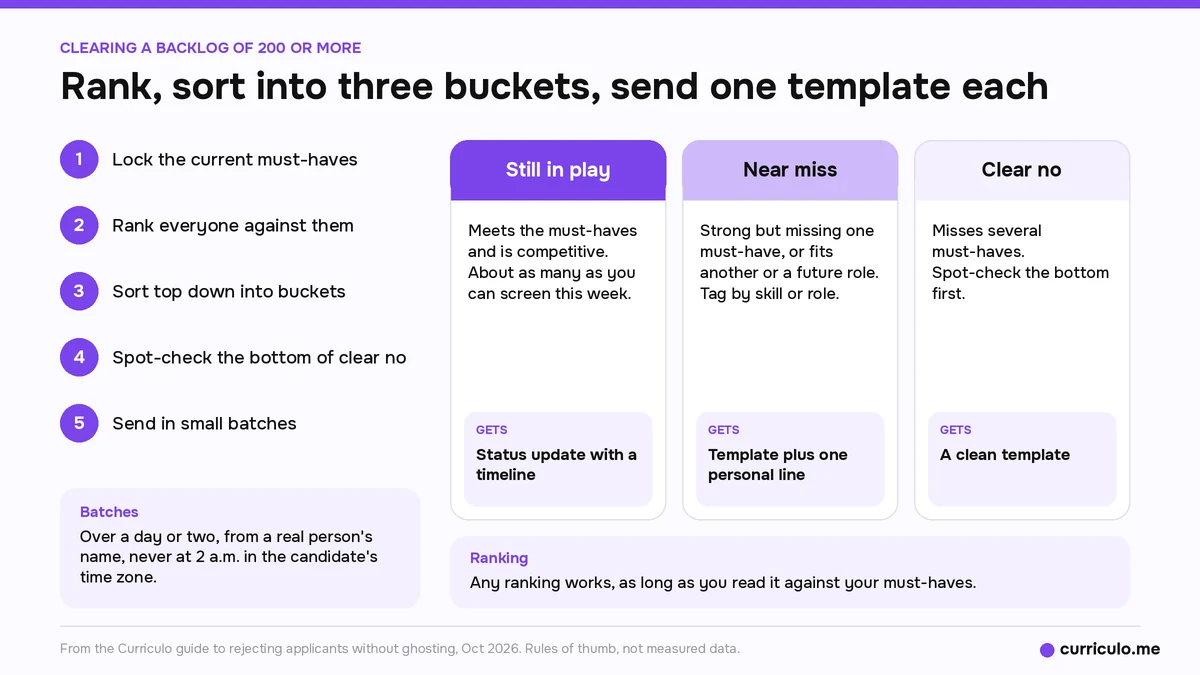
How to clear a backlog of 200 or more
Here's the process Dev suggests for a pile that's already overdue.
- Lock the current must-haves. Briefs drift over the life of a role, so write down what you're deciding against today.
- Rank everyone. Curriculo ATS scores every candidate from 0 to 100 against your job, with a written AI summary of the fit. Any ranking works, as long as you read it against your must-haves.
- Sort from the top down into three buckets. Still in play means they meet the must-haves and are competitive, and the bucket should be about as many as you can screen this week. A near miss is strong but missing one must-have, or fits another or a future role, so tag them by skill or role instead of "maybe." A clear no misses several must-haves.
- Spot-check the bottom of the clear-no bucket before anything goes out.
- Send. Near misses get a personalised line, clear nos get a clean template, and candidates still in play get a status update with a timeline.
For step 3, the resume screening guide to keyword scans, manual review and AI scoring shows how to layer the methods so the ranking holds up.
Sending in batches
Send in small batches over a day or two, from a real person's name, with the candidate's first name and the exact job title. Use one template per bucket. Add a specific human line for a near miss only if you'll act on it. If you're late, say so plainly, for example "Sorry this took longer than it should have." Don't send at 2 a.m. in the candidate's time zone.
In Curriculo ATS you can set up an automation that sends an email when a candidate moves into a pipeline stage, with an optional delay before it goes out.
Three example rejection emails
These are examples to edit, not legal wording. Replace everything in braces, and only promise timelines you'll meet. For more versions by stage, use the rejection email generator linked at the top of this guide.
Example 1, the acknowledgement
Hi {first name},
Thanks for applying for the {job title} role at {company}. We've got your application. We review applications within {X} business days, and you'll hear from us either way by {date}. If we'd like to talk, we'll email you to set up a short call.
{Name}, {title}
If you can't commit to a date, write "within two weeks" instead.
Example 2, the applied-stage clear no
Hi {first name},
Thanks for your interest in the {job title} role at {company} and for taking the time to apply. We've reviewed your application and won't be moving forward with it for this role. {Optional, only if true: We have other open roles at {link} if any are a fit.} We appreciate you considering us, and wish you the best with your search.
{Name}, {title}
No padding, no promise to keep them on file, and no reason at this stage.
Example 3, the close-out note
Hi {first name},
Thanks for applying for the {job title} role at {company}. I wanted to let you know directly that we've {closed / paused} this role, so we won't be moving any applications forward for now. This isn't a reflection on your application. {If paused: If the role reopens in the next few months, we'll email you first and you won't need to apply again.} Thanks again for your time and interest.
{Name}, {title}
Keep the reopen line only if someone owns it. Offer nothing you won't do.
What never to say
Dev's list of lines to keep out of every rejection:
- Anything touching protected characteristics or proxies for them. Avoid wording that touches on age, like "overqualified." Family or caregiving, health, accent or origin, and religion are all off limits, and so is "culture fit" without a job reason.
- "We'll keep your resume on file," unless you really will.
- A false reason, or one that differs from your internal record.
- Comparisons with the person you hired.
- "Not at this time" when the answer is no.
A one-line reason recorded for every decision makes that internal record easy to check, one of the habits in the guide to ATS metrics for small hiring teams.
Should you give feedback?
Dev's suggested default is feedback for candidates who interviewed with the hiring manager or client. Keep it job-related, about behaviour you saw, and consistent with what you recorded. Applied and screened candidates don't get feedback by default, but if someone asks after a screen, answer politely. Agencies should get the client's go-ahead first and put the feedback in job terms. This is general guidance, not legal advice.
LinkedIn and Indeed applicants
LinkedIn Help describes how to reject applicants on your LinkedIn job post. You rate a candidate as Not a fit, and with the Not a fit automations setting on, they get a rejection email after three days. A second help page, Automate sending rejection messages to job applicants, says you can change the rating before the message goes out. It also says applicants outside your selected country are tagged Not a fit by default, and for non-promoted jobs they're notified automatically unless the setting is off.
Indeed's guide to managing candidates on Indeed says applicants whose screener answers miss your required criteria are marked Rejected. They aren't notified unless you send them one of Indeed's templated email updates.
Dev's advice for platform applicants is to use the platform's reject or status action where it exists. It's the channel the candidate expects, and it stops them sitting on "applied" forever. If you have their email and you screened or spoke to them, a short direct note is warmer. Don't double-message clear nos. Easy Apply can bring a lot of volume, so rank, bucket and close out in batches the same week.
If your problem is the opposite, too few applicants since a tool change, see why applications drop after switching ATS.
Telling candidates you use AI
Say it up front, on the job post or apply page. Dev's suggested line: "We use software, including AI, to help rank applications. A person reviews every decision." In some places a notice like this is a legal requirement, so check where you hire. New York City's Local Law 144 on automated employment decision tools, for example, requires notice to candidates 10 business days before such a tool is used, plus a bias audit within the year before use.
In the rejection itself, don't make AI the reason. Say the team decided. Offer a way to ask for human review or more information. Never say you didn't use AI when you did, and never imply a person read every resume in full if nobody did. For more on outcome-based signals in hiring, see algorithmic fair hiring and outcome-based signals.
Colorado's SB 26-189 was signed on May 14, 2026 and applies to hiring and other consequential decisions made on or after January 1, 2027. Employers must give notice before using an automated tool that materially influences those decisions. If the outcome goes against a candidate, the employer has 30 days to describe the decision and the tool's role in plain language. Candidates can also correct their data and, where commercially reasonable, ask for human review. The Attorney General's rules are still being finalized, and a federal court order currently pauses enforcement. This is general information, not legal advice. If you hire in Colorado, ask your lawyer what it means for you.
The myth: saying nothing is kinder than a templated no
Silence leaves people waiting. A short, clear templated no within a week or two beats a personal note that never gets written.
A related myth says personal rejections can't scale. That mixes up the stages. Personalise after interviews, and use templates at the applied stage.
Frequently asked questions
How do I reject 200 applicants without emailing each one by hand?
Rank them, sort them into still in play, near miss and clear no, spot-check the bottom, and send one template per bucket in small batches over a day or two. Use the platform's reject action where it exists.
How soon should I send a rejection email?
Dev's timing is within about 1 to 2 weeks for applied-stage candidates, within a few business days for screened candidates, and within 1 to 3 business days after an interview. Send a close-out note the day a role closes or pauses.
Does marking someone Not a fit on LinkedIn notify them?
LinkedIn Help says that with the Not a fit automations setting on, candidates rated Not a fit get a rejection email after three days. You can change the rating before the message is sent.
What should a rejection email after an interview include?
Thanks for their time, a clear no, and feedback if you offer it. Keep feedback job-related and consistent with your notes. For finalists, call first and follow up by email within 1 to 3 business days.
Should I tell candidates AI helped rank them?
Say it up front on the job post or apply page, for example: We use software, including AI, to help rank applications. A person reviews every decision. In the rejection, say the team decided and offer a way to ask for human review.
More candidate experience and hiring guides are on the Curriculo ATS blog.