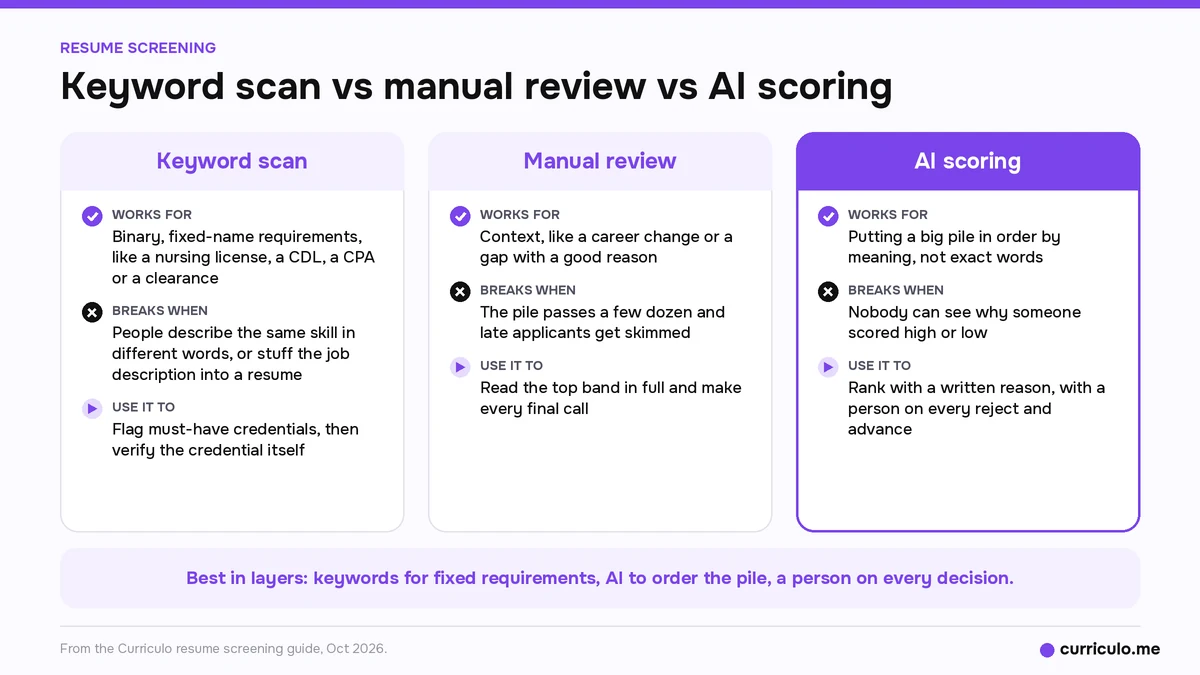
Resume screening works best in layers. Use keyword scans for fixed requirements like a nursing license or a CPA, let AI scoring put a big pile in order, and keep a person on every reject and every advance. Reading by hand stops scaling past a few dozen applicants, and a score nobody can explain is a liability.
By Dev Rishi Khare, former machine learning engineer at Amazon (search and recommendations) and Synopsys
You post a role on Monday, and by Wednesday the pile is bigger than you can read in a day. You read the first few carefully, skim the next batch, and the rest wait in Gmail. In Dev's view, that's how a lot of small teams screen, and it holds up until the pile gets big.
The workflow and rules of thumb below are Dev's view. Published sources and laws are linked by name.
How teams screen resumes now, and what breaks
In Dev's view, most small teams and independent recruiters read by hand, and often only the top of a pile sorted by date. Larger teams tend to use ATS keyword filters. AI scoring is newer. Each method fails in a different place.
Reading every resume by hand
Hand reading catches context, like a career change or a gap with a good reason. It doesn't scale past a few dozen applicants. The good applicant who came in late gets skipped, because by then you're skimming. The page on what manual resume screening costs in hiring speed covers that trade-off.
Keyword filters
Filters are fast and easy to set up. They also reject people who describe the same skill in different words, and they reward anyone who stuffs the job description into their resume.
AI scoring
AI scoring can read meaning instead of exact words. It breaks when nobody can see why someone scored high or low. A number with no reason behind it is hard to check, hard to defend to a client, and a legal risk under the new US rules on AI in hiring.
Scanning resumes for keywords, and when it's still the right tool
Scanning resumes for keywords still earns its place when the requirement is binary and has a fixed name. Good examples:
- Licenses, like a nursing license or a CDL.
- Certifications, like a CPA or a named cloud certification.
- Security clearances.
- Legal registrations.
- A required language.
A keyword match only starts the check. Confirm the match on the resume, then verify the credential itself before you submit anyone.
For skills that people describe in many ways, like sourcing, account management or data analysis, keyword search misses good people. The comparison of impact scoring vs keyword matching goes into why.
How to spot keyword stuffing
Dev's warning signs:
- A list of skills with no context.
- A long skills block that repeats the job description word for word.
- Tools listed with no project, outcome or dates attached.
- More tools than the years of experience could support.
- Hidden or white text. Paste the resume into a plain text editor and it shows up.
His test: for each must-have, point to a line where the candidate used it. If you can't find one, the keyword doesn't count.
How to catch the same skill in different words
Read what they did, not the label. Full-cycle hiring at a startup is talent acquisition, even if the phrase never appears. Keep a short synonym list for each must-have. Read the middle of the ranking as well as the top. If your tool writes a summary of the fit, use it to find meaning rather than exact words, and then check it against the resume instead of trusting it blindly.
A 300-applicant role, step by step
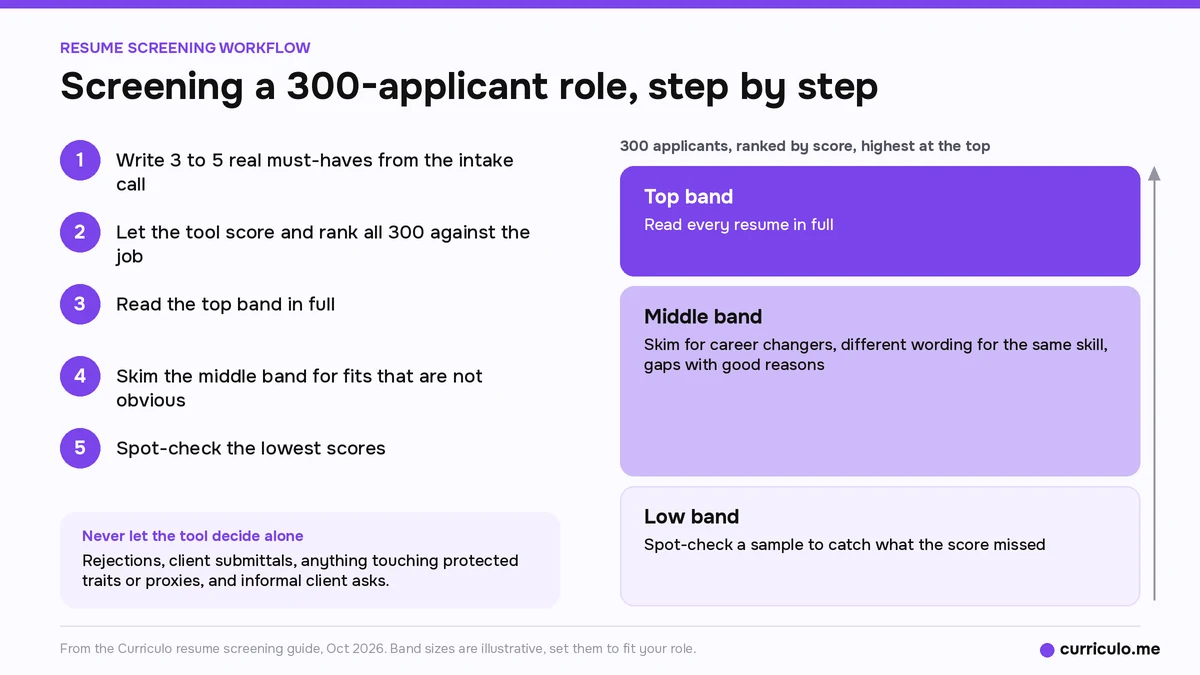
Here's Dev's workflow, using a role with 300 applicants as the example.
- Write 3 to 5 real must-haves from the intake call. The score is only as good as the job description.
- Let the tool score and rank all 300.
- Read the top band in full.
- Skim the middle band for fits that aren't obvious: career changers, different wording for the same skill, gaps with good reasons.
- Spot-check the lowest scores.
Once you have a shortlist, compare its size with the average number of candidates interviewed per hire to see whether you're sending too many people to interview.
What never to let the tool decide alone
- Rejections.
- Client submittals.
- Anything touching protected characteristics or proxies for them, such as age, caregiving gaps or school names.
- Informal client asks that aren't in the job description.
When you disagree with a score
Read the reason in the summary first. Check it against the resume. If the tool missed something because the job description left it out, fix the job description and rescore rather than quietly overriding. Then log the override with a one-line reason. That record of a human decision matters more as US rules on AI hiring tools spread.
How much to automate, by team size
Dev's rule: the more people a decision affects, the more a human signs it.
Solo recruiters
Let the tool handle logging, ranking, confirmation and status emails, booking calls, and a daily list of who's waiting. Let it suggest a shortlist order, draft follow-ups, and resurface past candidates. You handle intake, every submit and reject, offers, and relationship calls. If you're still choosing a tool, the guide to choosing an ATS for independent recruiters covers day-one needs and deal-breakers.
Teams of 2 to 10
Add shared pipelines and consistent templates. The tool can suggest hand-offs, warn about duplicates and nudge on stalled roles. Humans keep the same decisions as a solo recruiter, and agree on scoring criteria as a team before the first role goes live.
Teams of 10 or more
The tool takes on high-volume first-pass ranking, scheduling at scale, routine messages and reporting, and suggests review bands and workload balance. People keep final decisions and relationships, and run regular bias and drift audits with a named owner and a written record of human review.
Habits that keep your screening defensible
These are Dev's habits for small teams. None of them need a big budget.
- Write the must-haves before scoring, and score only against those.
- Log every human decision with a one-line reason, especially when you disagree with the score.
- Tell candidates that AI helps rank applications and a person decides, and offer human review.
- Spot-check low scores every month or every role.
- Compare pass-through rates across groups where volume allows. At tiny volume, write down that the sample is too small.
- Strip or ignore proxies such as photos, birth years and caregiving gaps.
- Recheck the job description whenever the brief changes.
- Know your vendor: what the score is based on, and whether you can see why.
If you hire in New York City, NYC Local Law 144 applies. It bars employers and employment agencies from using an automated employment decision tool unless the tool has had a bias audit within one year of its use. A summary of the audit results must be public, and candidates must get the required notices. Enforcement began in July 2023. This is general information, not legal advice, so check your obligations with counsel.
The 75% auto-rejection myth
You've probably read that ATS software rejects 75% of resumes before a human sees them. The earliest dated source we found is a Computerworld article from March 4, 2012, which credits the figure to Preptel, a job search services company that helped job seekers get their resumes past applicant tracking systems. The article doesn't cite a study, sample or method for the number.
A real problem sits close by. The Hidden Workers report from Harvard Business School and Accenture (September 2021) found that 88% of employers agreed qualified high-skills candidates get screened out. The reason they gave: those candidates don't match the exact criteria in the job description. The report's focus is rigid filters, such as exact-match requirements and treating an employment gap as a reason to exclude someone.
In Dev's view, most ATSs rank and sort rather than silently delete. The usual reason an applicant hears nothing is volume plus human triage: someone ran out of time before reaching that resume. The exception is knockout questions, such as a required license or work authorization, which some ATSs use to filter applicants automatically, so check how yours is set up.
Where Curriculo ATS fits
Curriculo ATS scores every candidate from 0 to 100 against your job, with a written AI summary of the fit. The Resume screening agent ranks applicants against the job automatically behind the scenes once you sign in. Starter is free forever and ranks up to 1,000 candidates. Pro is $50/mo early-bird (50% off the $100 list price) and ranks up to 10,000, with no per-seat fees on any plan. Product details are on the AI resume screening page with 0 to 100 scores.
Frequently asked questions
What is resume screening?
Resume screening is the first pass through applications to decide who's worth a closer look for a role. Teams do it by hand, with keyword filters, with AI scoring, or with a mix of all three.
Is scanning resumes for keywords still useful?
Yes, for binary requirements with a fixed name, such as a nursing license, a CDL, a CPA, a security clearance or a required language. Confirm the match, then verify the credential itself.
Do ATS systems reject 75% of resumes?
No published method backs that figure. The earliest dated source we found is a 2012 Computerworld article crediting it to Preptel, a job search services company that helped job seekers get past applicant tracking systems. In Dev's view, most ATSs rank and sort rather than silently delete.
Should AI make screening decisions on its own?
In Dev's view, no. Let the tool rank and summarize, and keep a person on every reject and every advance. Log a one-line reason for each decision, especially when you disagree with the score.
More screening and hiring guides are on the Curriculo ATS blog.