 Curriculo
 How to run your entire ATS inside Claude
Most recruiters do not have a hiring problem. They have a tab problem.
Your shortlist is in the ATS. The scores are in a spreadsheet you exported last Tuesday. The interview invites live in your email drafts. To answer one simple question, "who are my five best candidates right now," you click through four tools and stitch the answer together by hand. By the time you have it, two of those candidates have accepted somewhere else.
What if you could just ask?
That is the whole idea behind connecting Curriculo ATS to Claude. You type a question in plain English, and your hiring pipeline answers back, ranked, sourced, and ready to act on. No exports. No copy-paste. This guide shows you how to set it up in under two minutes and what to do in your first ten minutes once it is live.
What is the Curriculo ATS MCP connector?
The Curriculo ATS MCP connector is a secure, two-way link between your Curriculo ATS account and Claude, built on the Model Context Protocol (MCP), the open standard Anthropic created so AI assistants can talk to outside tools. Once you add it, Claude can read your jobs, applicants, evaluations, and inbox, and, when you allow it, take actions like scheduling interviews or sending candidate emails.
Think of it as giving Claude a read-and-write key to your recruiting data, scoped exactly the way you want. Reading your pipeline is on by default. Anything that changes data or contacts a candidate asks for your approval first. You are never handing over the keys and walking away. You are sitting in the chat, approving each step.
The connector lives at one Remote URL. That single address is everything Claude needs to reach your account.
https://mcp.curriculo.me/mcp
What can you actually do with it?
Plenty. These are real tasks people run on day one, not hypotheticals:
- Ask how many jobs are open and see the top candidates for each, ranked by AI fit score
- Rank or re-rank any pipeline by years of experience, stage, or your own criteria
- Pull a candidate's full evaluation, resume text, and email history in one reply
- Search every applicant across all jobs for a specific skill or background
- Read your recruiting inbox and draft replies in your voice
- Schedule interviews and send invites, with Claude confirming the details before anything sends
- Get dashboard numbers and hiring analytics without opening a single report
The pattern is always the same. You ask. Claude pulls the live data. You decide what happens next.
What you'll need before you start
Three things, and you probably already have all of them:
| You need | Details |
|---|---|
| A Curriculo ATS account | The free Starter plan works. Sign up at curriculo.me if you do not have one. |
| A Claude account | Custom connectors using remote MCP work on Free, Pro, Max, Team, and Enterprise plans. Free accounts can add one custom connector. |
| Two minutes | That is genuinely all the setup takes. |
One note for teams: on Claude Team and Enterprise, an organization owner has to switch connectors on once, under Admin settings, before individual members can add their own. If you are on a personal Free, Pro, or Max plan, there is nothing to enable. You can add it right now.
How to connect Curriculo ATS to Claude, step by step
Here is the full setup. Five steps, no code.
- Open Settings in Claude. Click your profile, then go to Settings and select Connectors.
- Click "Add custom connector." You will find it at the bottom of the Connectors list, under the connectors Claude already offers.
- Paste the Remote URL. Enter
https://mcp.curriculo.me/mcpas the server URL and give it a name like "Curriculo ATS." - Authenticate. Claude opens a secure sign-in window. Log in to Curriculo and approve access. This uses OAuth, so Claude never sees your password.
- Set tool permissions. The read-only tools, the ones that only look at your data, are safe to set to Always allow. The tools that write data or email candidates stay on Ask first, so Claude has to check with you before it acts.
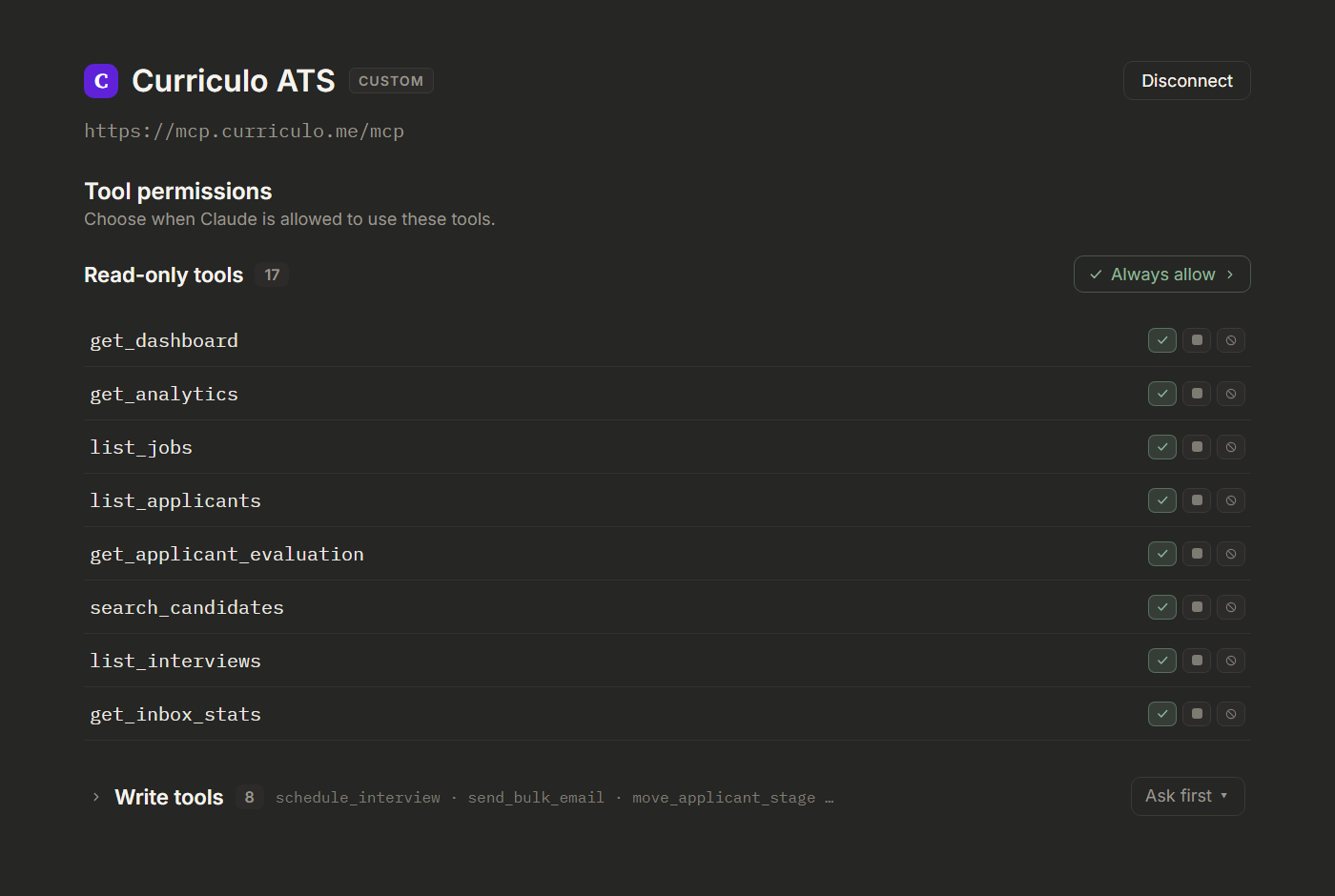
That is it. Curriculo ATS is now part of Claude. Start a new chat and try your first question.
Your first question: rank every candidate by AI fit
The fastest way to feel the difference is to ask the one question that usually takes you twenty minutes of clicking.
Try this prompt: "How many jobs are active? And show me the top 5 candidates of each active job."
Claude loads your live pipeline and comes back with every open role and its top candidates, ranked by Curriculo's AI suitability score, with the stage and years of experience for each. No tab-switching. No stale export. The numbers are whatever they are in your ATS this minute.
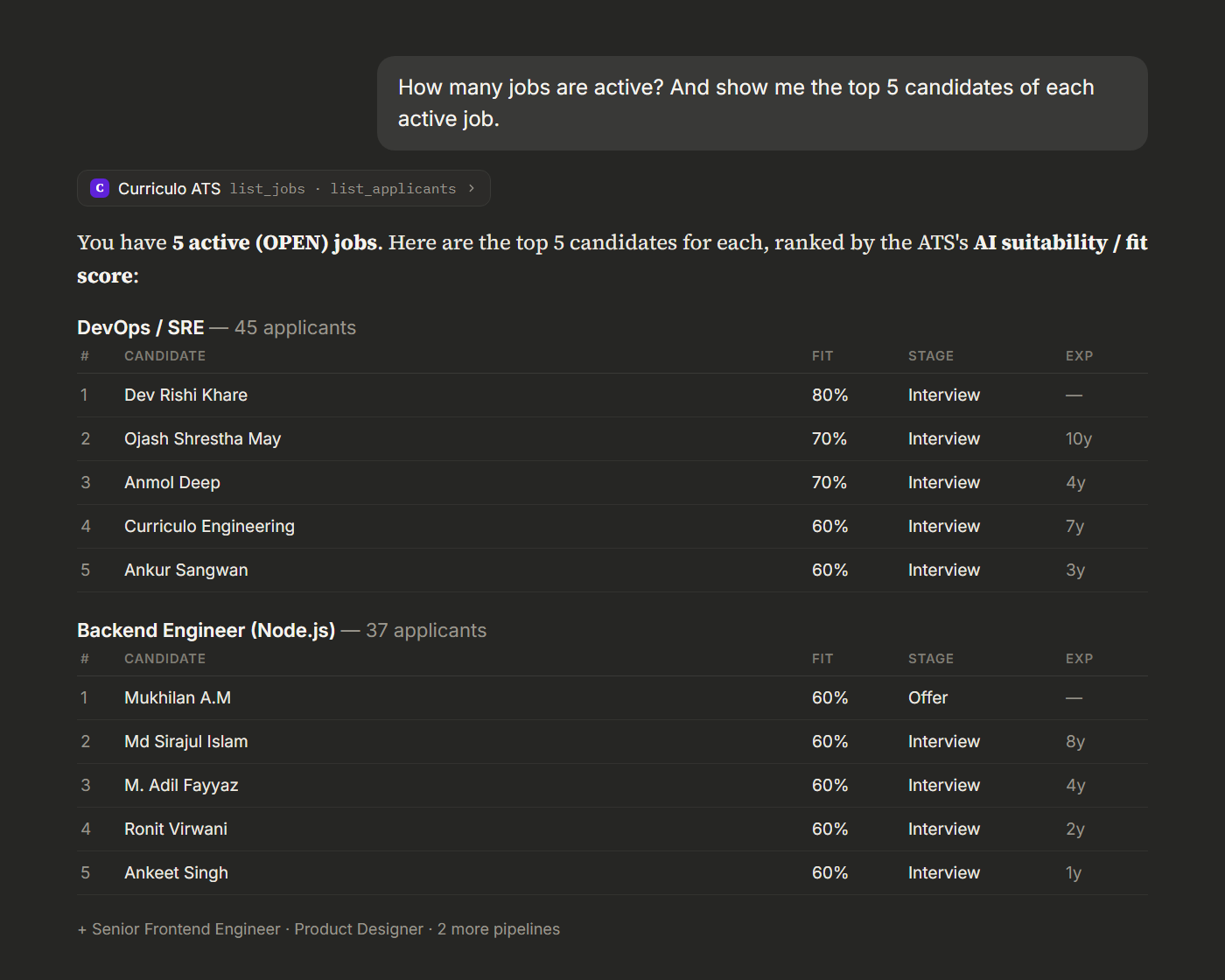
This is the moment most recruiters pause. You just asked a question in the same words you would use with a colleague, and a ranked, sourced answer came back. From here you can drill in: "show me Anmol Deep's full evaluation," or "re-rank DevOps by years of experience instead." Claude already has the context.
Letting Claude take action: schedule interviews from chat
Reading data is useful. Acting on it is where the time savings get real. Watch what happens when you ask Claude to do something that touches a candidate.
Try this prompt: "Based on their score, send the top 5 an online interview invite. They have to complete it before June 12."
Notice what Claude does not do. It does not blast five emails the second you hit enter. Because these are real messages to real people that cannot be unsent, it stops and asks the questions a careful recruiter would ask first.
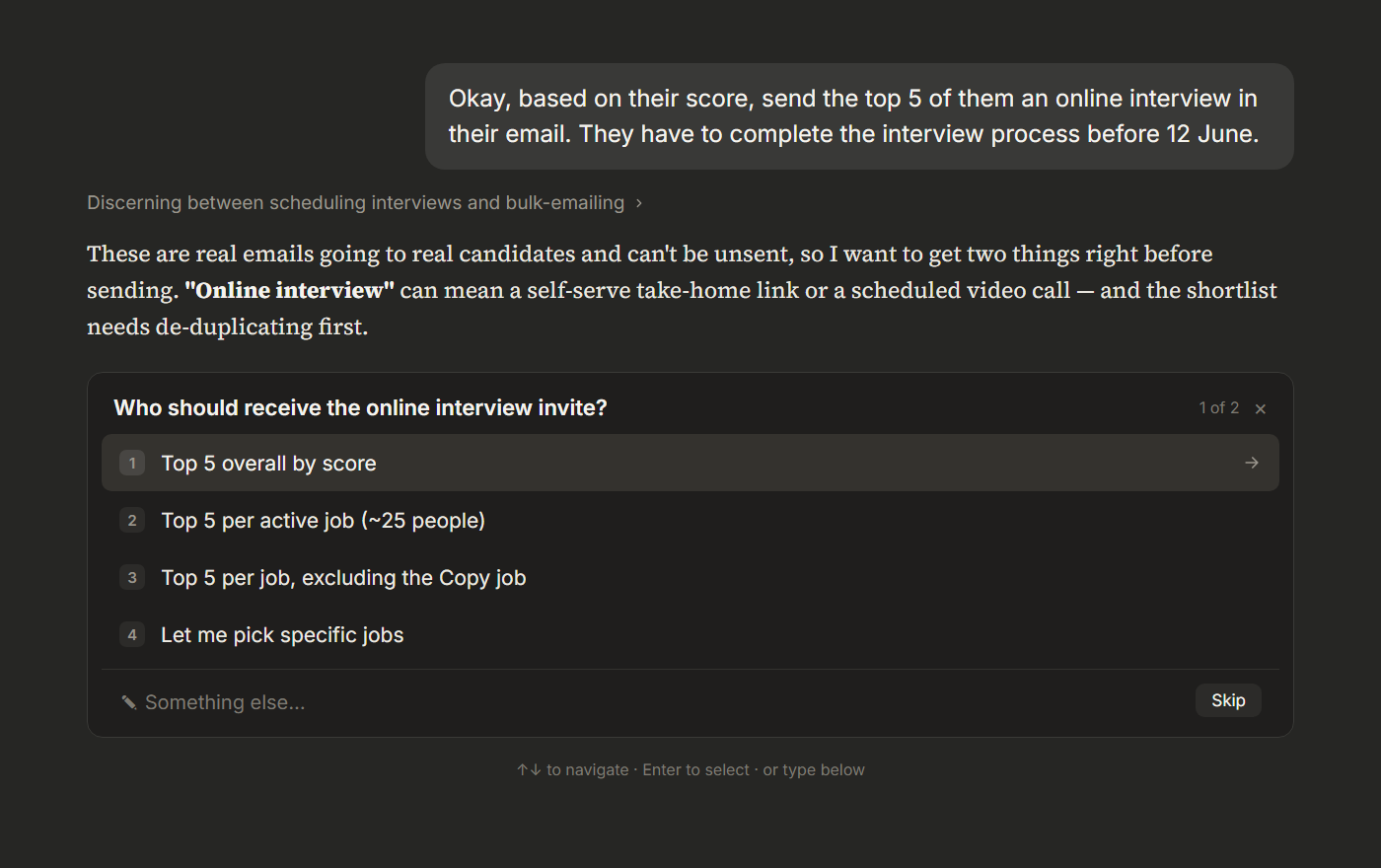
It clarifies who exactly should get the invite, and it spots a problem you might have missed: one candidate was sitting in three of the top slots because of a duplicate job, so it de-duplicates the shortlist and verifies the addresses before doing anything.
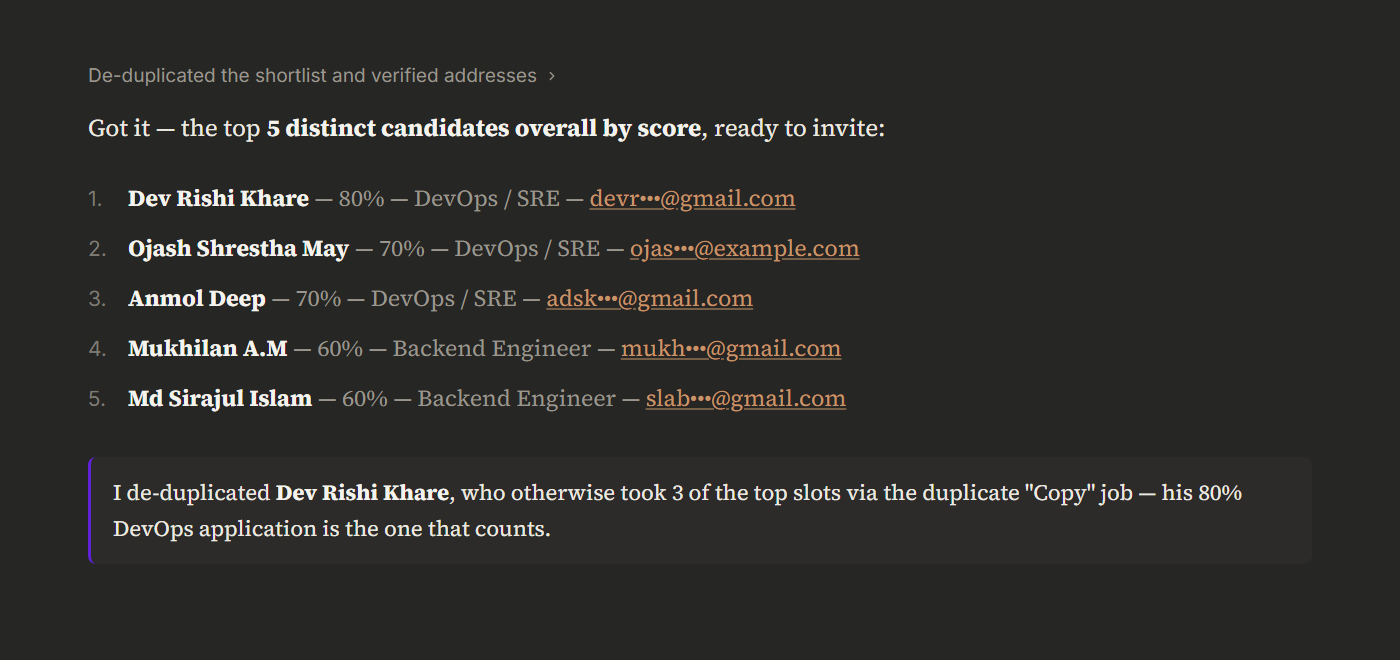
Only after you confirm does it act. Then it writes the interviews straight back into your ATS and shows you the result, each candidate scheduled, each invite accounted for.
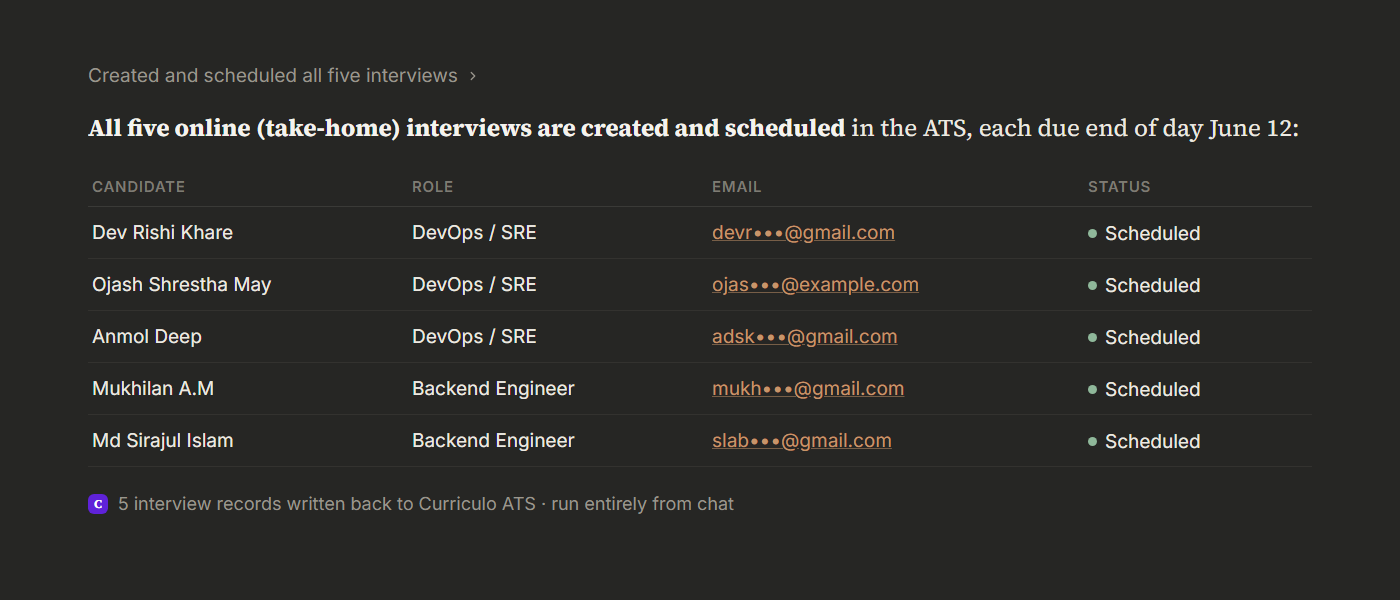
The whole loop, from "who are my best people" to "they are all scheduled," happened in one chat, in the time it used to take to open the spreadsheet.
Watch it in action
Here is the full flow in under a minute:
Is it safe? Permissions and privacy
This is the right question to ask before connecting any tool to your candidate data, so here is the honest answer.
You stay in control at three levels. First, reading is separate from acting. The tools that only view your data can be set to run freely, while every tool that writes data or emails a candidate is held back until you approve it. Second, sign-in uses OAuth, the same standard "Sign in with Google" uses, so Claude is granted scoped access and never stores your password. Third, you can disconnect in one click from the same Connectors screen, which instantly revokes access.
Claude also will not send anything irreversible without telling you. As you saw above, when an action reaches real candidates, it pauses, confirms the details, and flags anything that looks off, like a placeholder email that might bounce. The point of the connector is to make you faster, not to take the steering wheel.
10 prompts to try in your first week
Copy these straight into Claude once the connector is live:
- "How many jobs are open and how many applicants does each have?"
- "Show me the top 5 candidates for [job] ranked by AI fit, with their current stage."
- "Who in the Backend pipeline has more than 5 years of experience?"
- "Pull [candidate]'s full evaluation and resume summary."
- "Search every job for candidates with Kubernetes experience."
- "Which candidates have been sitting in the Interview stage for over a week?"
- "Draft a warm rejection email for the candidates still in New for [job]."
- "Summarize my recruiting inbox and tell me what needs a reply today."
- "Move [candidate] to the Offer stage and add a note about the salary discussion."
- "Give me this month's hiring numbers: time to hire, candidates per role, offers out."
Start with the read-only ones. As you trust the output, hand over the action prompts.
Frequently asked questions
Which Claude plans support the Curriculo ATS connector?
Is my candidate data used to train AI?
Can Claude actually send emails to candidates?
Does it work on Claude desktop and mobile?
How is this different from copy-pasting into ChatGPT?
What tools does the connector include?
Start running your ATS from Claude
Hiring is hard enough without fighting your own tools. Connecting Curriculo ATS to Claude turns the busywork, the exports, the ranking, the scheduling, into a conversation, and gives you back the hours you would rather spend talking to candidates. Open Claude, go to Settings, Connectors, Add custom connector, and paste the Remote URL. Then ask your pipeline a question and see what it says back.
Part of the Curriculo ATS MCP hub, which links the setup guides, the tools reference and the connector docs.